
Choosing the right display technology can feel overwhelming, can't it? With so many options, it's hard to know which one will truly meet your needs.
Standard LED and OLED displays differ significantly in picture quality, response time, and flexibility. LEDs tend to be brighter and more energy-efficient, while OLEDs offer deeper blacks and vibrant colors. Understanding these differences is crucial for making a well-informed purchasing decision.
As someone who has spent countless hours researching and testing display technologies, I understand the struggle. I've had my share of confusion trying to decide between standard LED and OLED, especially when it comes to picture quality and performance. I remember the excitement of finally unboxing my new OLED TV, only to be blown away by the colors and contrast. But then again, there's something reliable about standard LEDs that can’t be ignored.
In this blog post, I'll share what I've learned about these two popular display technologies—covering everything from their unique characteristics to practical considerations that could influence your choice. You might find just the insights you need to make an informed decision.
OLED displays offer better contrast than standard LED displays.True
OLED technology allows for true blacks, enhancing contrast ratios significantly compared to standard LED displays.
Standard LED displays are more flexible than OLED displays.False
Standard LED displays are generally rigid and less flexible compared to the bendable nature of OLED technology.
What Are the Key Advantages of OLED Displays?
When I first laid my eyes on an OLED display, it was like stepping into a new world of colors and contrasts. But what exactly makes OLEDs so special? Let's dive into the captivating advantages together!
**OLED displays are celebrated for their stunning picture quality, vibrant colors, and energy efficiency. They allow each pixel to shine independently, resulting in deep blacks and rich visuals. If you're looking for a top-notch viewing experience, OLED is hard to beat! Now, let’s explore these benefits in more detail together!
Superior Picture Quality
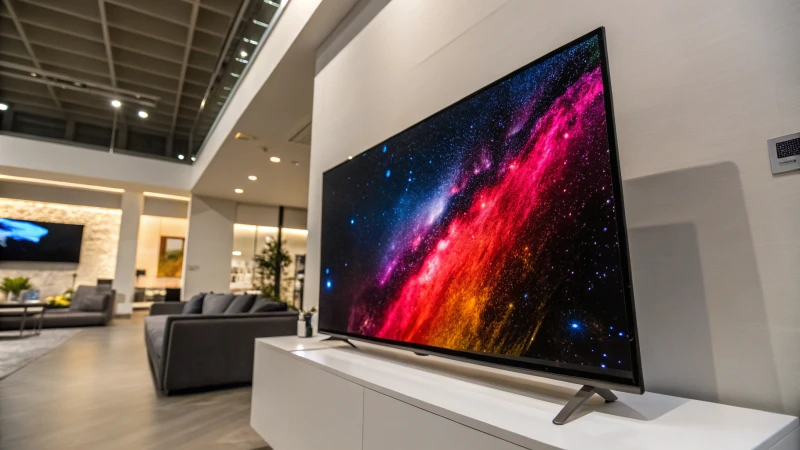
I remember the first time I watched a movie on an OLED screen. As I settled in for an evening of entertainment, I was captivated by the breathtaking quality. Each pixel emits its own light, which means those deep blacks and vibrant colors just leap off the screen. Imagine watching a starry night scene; the stars seemed to twinkle against an endless pitch-black sky, creating a visual feast that left me spellbound. Unlike traditional LCDs with their backlighting, OLEDs can turn off individual pixels completely, providing that striking contrast that enhances every frame.
Wide Viewing Angles
Have you ever had friends over for movie night only to realize that not everyone has the best seat in the house? With OLED technology, that worry fades away. These displays maintain their color accuracy and brightness from nearly any angle, making them perfect for group viewing. Whether you’re lounging on the couch or sprawled out on the floor, everyone gets to enjoy the same stunning visuals. It’s a game-changer for family gatherings!
Faster Response Times
As someone who loves gaming and sports, I can’t stress enough how important response time is. OLED displays shine here as well! The rapid response times mean that fast-paced action sequences come through without any motion blur. Picture yourself in an intense gaming battle; the difference in refresh rates can really elevate the experience, allowing for smooth action that immerses you fully in the game. It’s like being right there in the action!
Energy Efficiency
I often think about how technology impacts our environment, and that’s where OLEDs have another edge. They can be more energy-efficient than traditional displays when showing darker images because of their pixel-level lighting capabilities. However, it’s important to note that they might consume more power with bright images. Finding that balance between performance and energy consumption is vital for making informed choices—especially if you’re keen on sustainability! Understanding how energy efficiency factors into your decision can guide you toward smarter purchases.
Thinner and Lighter Designs
Finally, let’s talk about aesthetics. The construction of OLED displays allows for incredibly thin and lightweight designs. I’ve always appreciated devices that blend functionality with style, and OLEDs are leading the charge in design innovation. As technology advances, we see sleeker TVs and monitors becoming more common, giving us not just excellent viewing experiences but also beautiful pieces of art to complement our spaces.
Conclusion?
In conclusion, the advantages of OLED displays are truly compelling for anyone considering an upgrade to their visual technology. With remarkable picture quality, wide viewing angles, and stylish designs, they really stand out from the crowd. Just remember to weigh these benefits against your specific needs before making a decision. Whether you're a casual viewer or a dedicated gamer like me, there’s something special about experiencing content on an OLED screen.**
Key Advantages of OLED Displays
The key advantages of OLED displays include superior picture quality with deep blacks, wide viewing angles, faster response times, energy efficiency, and sleek designs that enhance modern aesthetics.
Superior Picture Quality
OLED displays are renowned for their unparalleled picture quality. This technology allows each pixel to emit its own light, resulting in deep blacks and vibrant colors. Unlike traditional LCDs that use backlighting, OLEDs can turn off individual pixels completely, creating a true black that enhances overall contrast.
For example, when displaying a starry night sky, an OLED screen can present stars against a pitch-black background, making the scene visually striking.
Wide Viewing Angles
Another key advantage of OLED technology is its wide viewing angles. In contrast to LCD screens, which tend to lose color accuracy and brightness at steep angles, OLEDs maintain their integrity. Users can enjoy consistent colors and clarity from various positions, making them ideal for group viewing.
Faster Response Times
OLED displays also boast faster response times compared to other technologies. This rapid response reduces motion blur in fast-paced scenes, making it a preferred choice for gamers and sports enthusiasts. For instance, in gaming, the difference in refresh rates can significantly enhance the experience, allowing for smooth action sequences without lag.
| Feature | OLED Displays | LCD Displays |
|---|---|---|
| Picture Quality | Excellent | Good |
| Viewing Angles | Wide | Narrow |
| Response Time | Fast | Moderate |
| Energy Efficiency | Moderate | High |
Energy Efficiency
While OLEDs are generally more energy-efficient than traditional display technologies when showing darker images due to pixel-level lighting, they may consume more power when displaying bright images. This balance is crucial for users considering energy consumption alongside performance. Understanding how energy efficiency1 plays into your choice can guide smarter purchases.
Thinner and Lighter Designs
The construction of OLED displays allows for thinner and lighter designs. This characteristic enables manufacturers to create sleek devices that are aesthetically pleasing and easier to handle. As technology advances, the trend toward ultra-thin TVs and monitors continues to grow, making OLED a frontrunner in design innovation.
Conclusion?
Overall, the advantages of OLED displays make them a compelling choice for consumers looking to invest in high-quality visual technology. With exceptional picture quality, viewing angles, and design flexibility, they stand out among competitors. However, potential buyers should weigh these benefits against their specific needs and preferences before making a purchase.
OLED displays provide superior picture quality over LCDs.True
OLED technology allows for individual pixel lighting, resulting in deeper blacks and vibrant colors, surpassing traditional LCD displays.
OLED displays are less energy-efficient than LCDs at all times.False
While OLEDs are more efficient with dark images, they consume more power with bright images compared to LCDs, making this claim false.
How Do LED and OLED Displays Compare in Picture Quality?
Have you ever found yourself torn between choosing an LED or an OLED display? I know I have! Let’s unravel the key differences that could dramatically enhance your viewing experience.
When comparing LED and OLED displays in terms of picture quality, LEDs shine in brightness and energy efficiency. However, OLEDs take the lead with their superior contrast and vibrant color accuracy. Knowing these differences is key to making an informed decision that enhances your viewing experience.

Understanding LED Displays
LED displays use light-emitting diodes as a backlight for the liquid crystal display (LCD) panel. This technology offers bright and vibrant images, making them ideal for various environments.
Key Features of LED Displays:
- Brightness: LED displays are known for their high brightness levels, which make them suitable for well-lit rooms. I often enjoy watching movies during the day, and I appreciate how clear everything looks.
- Energy Efficiency: They consume less power compared to traditional LCDs, which is great for the environment and my wallet!
- Lifespan: LED technology typically has a longer lifespan than many other display technologies, allowing me to enjoy my LED display for years without worrying about dimming.
| Feature | Description |
|---|---|
| Brightness | High, excellent in bright rooms |
| Energy Use | Lower than traditional LCDs |
| Lifespan | Up to 50,000 hours |
For more on the advantages of LED technology, check out this detailed article2.
Exploring OLED Displays
On the other hand, OLED (Organic Light Emitting Diode) displays feature individual pixels that emit their own light. This leads to deeper blacks and a more dynamic range of colors, significantly enhancing the overall picture quality.
Key Features of OLED Displays:
- Contrast Ratio: OLED displays have an infinite contrast ratio due to their ability to turn off individual pixels completely. I still recall the first time I saw true black on my screen; it was magical!
- Color Accuracy: They tend to produce richer and more accurate colors compared to LED displays, making every scene feel more immersive.
- Viewing Angles: OLED screens maintain color and brightness at wider viewing angles. I love hosting movie nights because everyone gets a great view.
| Feature | Description |
|---|---|
| Contrast Ratio | Infinite due to pixel control |
| Color Accuracy | Superior, vibrant colors |
| Viewing Angles | Excellent, consistent across angles |
To understand the technical differences further, explore this in-depth comparison3.
Side-by-Side Comparison
Let’s summarize the differences in picture quality between LED and OLED in a comparative table:
| Aspect | LED Display | OLED Display |
|---|---|---|
| Brightness | High | Moderate |
| Black Levels | Good (backlight bleed possible) | Perfect (true black) |
| Color Range | Good | Excellent |
| Response Time | Moderate | Fast |
| Lifespan | Long | Long but may vary |
For insights into practical applications of each technology, consider this useful guide4.
LED displays have higher brightness levels than OLED displays.True
LED displays are known for their high brightness, making them suitable for bright environments, while OLEDs have moderate brightness.
OLED displays offer superior color accuracy compared to LED displays.True
OLED technology allows for richer and more accurate colors due to individual pixel control, surpassing LED displays in color performance.
What Should You Consider for Eye Comfort When Choosing a Display?
When it comes to finding the perfect display for eye comfort, there’s so much to consider that can make a world of difference. Let’s dive into the essentials that can help protect your precious eyesight!
**To ensure eye comfort when choosing a display, consider brightness, contrast, color temperature, screen size, and additional features like blue light filters and flicker-free technology. Proper usage practices also play a vital role in maintaining visual health.
Monitor Specifications to Consider
Additional Features for Eye Comfort
Blue Light Filters: These features have become my best friends! Many modern monitors come with settings that can be adjusted to lower blue light exposure during evening hours. It’s a lifesaver for my sleep cycle after long days of work.
Flicker-Free Technology: If you’re sensitive to flickering (like I am!), look for displays that use flicker-free technology. It stabilizes brightness levels and makes those marathon work sessions feel much easier on the eyes.
Ergonomic Design: I can’t stress enough how important it is to choose monitors with adjustable stands! Being able to change the height and angle of the display helps me maintain better posture and prevents neck strain, which indirectly benefits my eyes too.
Practical Tips for Usage
- Follow the 20-20-20 Rule: Every 20 minutes, I take a 20-second break to gaze at something 20 feet away. Trust me; it really helps alleviate eye fatigue!
- Proper Lighting: My workspace is always well-lit, but I make sure to avoid direct lighting on the screen. Minimizing glare is crucial for maintaining comfort.
- Screen Positioning: Keeping my monitor about an arm's length away and ensuring the top of the screen is at or just below eye level has transformed my viewing experience for the better!
If you’re eager to enhance your screen experience even further, check out ergonomic display setups or best monitors for eye health. Each little change can lead to significant comfort improvements!
As someone who has learned these lessons through experience, I hope these insights guide you toward making informed choices that keep your eyes happy and healthy.**

Understanding Eye Comfort
I vividly remember the first time I worked late into the night on a project, glued to my screen. As the hours ticked by, my eyes began to feel heavy, and I could practically hear them begging for a break! It was a wake-up call that made me realize just how important eye comfort is, especially for someone like me who often spends long hours in front of a display.
When choosing a display, eye comfort is paramount. Factors such as brightness, contrast, and color temperature play a significant role in reducing eye strain.
- Brightness: I’ve learned that adjusting the brightness of my display to harmonize with the ambient lighting can do wonders. If it's too bright or too dim, discomfort and fatigue quickly follow.
- Contrast: High contrast between text and background? Yes, please! It enhances readability and makes a significant difference in how easily I can focus. I prefer displays that let me tweak contrast settings to match my needs.
- Color Temperature: I never realized how blue light could affect my eyes until I started using displays with adjustable color temperature settings. Warmer hues are like a cozy blanket for my eyes, especially during those late-night sessions.
Monitor Specifications to Consider
| Feature | Recommendation | Explanation |
|---|---|---|
| Screen Size | 24 inches or larger | Larger screens can reduce eye strain by allowing a more comfortable viewing distance. |
| Resolution | 1920 x 1080 or higher | Higher resolution reduces pixelation, leading to sharper images and less strain. |
| Refresh Rate | 60Hz minimum | Higher refresh rates can provide smoother visuals, decreasing flicker and discomfort. |
| Anti-Glare Coating | Yes | Reduces reflections and glare from ambient light sources, enhancing comfort. |
Additional Features for Eye Comfort
- Blue Light Filters: Many modern monitors come with blue light reduction features or settings that can be adjusted to lessen blue light exposure during evening hours. This feature is beneficial for those who work late and wish to minimize disruption to their sleep cycle.
- Flicker-Free Technology: Displays that employ flicker-free technology can significantly enhance comfort, particularly for users sensitive to screen flickering. This technology stabilizes brightness levels, reducing eye strain during long sessions.
- Ergonomic Design: Choose monitors with adjustable stands that allow you to change the height and angle of the display. This flexibility promotes better posture and reduces neck strain, indirectly contributing to eye comfort.
Practical Tips for Usage
- Follow the 20-20-20 Rule: Every 20 minutes, take a 20-second break and look at something 20 feet away to reduce eye fatigue.
- Proper Lighting: Ensure that your workspace is well-lit but avoid direct lighting on the screen to minimize glare.
- Screen Positioning: Position your monitor about an arm's length away and ensure the top of the screen is at or just below eye level for optimal comfort.
For further insights on enhancing your screen experience, check out ergonomic display setups5 or best monitors for eye health6.
Higher brightness settings always improve eye comfort.False
This claim is false; excessive brightness can cause glare and discomfort, especially in low-light environments.
Adjustable color temperature can reduce eye strain.True
This claim is true; warmer color temperatures lower blue light exposure, enhancing eye comfort during prolonged screen use.
What’s the Difference in Lifespan and Durability Between LED and OLED Technologies?
If you're on the hunt for a new display, understanding the differences in lifespan and durability between LED and OLED technologies can make all the difference in your decision. Let's dive in!
When comparing LED and OLED technologies, LED displays typically outlast OLEDs, boasting lifespans of up to 100,000 hours versus OLED's 30,000-50,000 hours. Durability factors include temperature sensitivity and usage patterns, which are crucial in making an informed decision.

Lifespan of LED vs. OLED
LED (Light Emitting Diode) displays typically boast a lifespan of around 50,000 to 100,000 hours, depending on usage and environment. This longevity makes them an ideal choice for commercial projects where operational costs are critical. In contrast, OLED (Organic Light Emitting Diode) technology, while offering superior color and contrast, generally lasts between 30,000 to 50,000 hours. The shorter lifespan can be attributed to the organic materials used in OLEDs that degrade faster over time.
For instance, if a display is used for 10 hours a day, an LED would last about 13 to 27 years, while an OLED might last around 8 to 14 years. These numbers can impact long-term project planning and budgeting significantly.
Factors Influencing Durability
Durability can be influenced by several factors, including:
| Factor | Impact on LED | Impact on OLED |
|---|---|---|
| Temperature | Less sensitive; performs well in various conditions | Sensitive to high temperatures; can degrade faster |
| Brightness Levels | Maintains performance over time | Can suffer from burn-in at high brightness levels |
| Usage Patterns | Designed for prolonged use | May require more careful management to avoid early failure |
These factors highlight why LED displays are often preferred in commercial environments where reliability is crucial. Additionally, the choice of materials and the manufacturing process plays a significant role in the durability of both technologies.
Applications and Suitability
When selecting between LED and OLED, consider the specific application:
- LED: Great for bright environments like retail spaces or outdoor displays where durability and longevity are paramount.
- OLED: Ideal for home theaters or environments where image quality is prioritized over lifespan.
Understanding these differences helps in making informed decisions tailored to specific project requirements. For more insights on suitable applications, check out our guide on display technologies.
Conclusion?
While this section does not conclude with a final verdict, it is clear that both LED and OLED technologies have their unique advantages and considerations regarding lifespan and durability. Exploring these differences further can aid in selecting the right technology for your needs.
LED displays can last up to 100,000 hours.True
LED technology offers a lifespan ranging from 50,000 to 100,000 hours, making it highly durable.
OLED displays are more durable than LED displays.False
OLEDs typically last 30,000 to 50,000 hours, indicating lower durability compared to LEDs.
Conclusion
Explore the differences between LED and OLED displays in terms of picture quality, energy efficiency, lifespan, and suitability for various applications to make informed purchasing decisions.
Discover the full range of benefits offered by OLED technology to enhance your viewing experience and aid your purchasing decision. ↩
Discover detailed insights that will help you understand which display technology is best for your needs. ↩
Gain a deeper understanding of OLED technology and its benefits compared to LED displays. ↩
Explore practical uses of LED vs OLED displays in different settings to see which is more effective. ↩
Clicking this link will provide you with detailed advice on ergonomic display setups that prioritize your eye comfort and overall health. ↩
This link will guide you to reviews of monitors specifically designed for eye health, helping you make an informed purchase decision. ↩